If you’re looking to unlock a world of entertainment on your Amazon Firestick, learning how to download IPTV Smarters Pro on Firestick is the perfect first step. This popular, free app lets you organize all your favorite live TV, movies, and shows in one place. This simple guide will walk you through the entire process, from installation to setup, and even how to fix common problems. Let’s get your Firestick streaming!
What You’ll Need Before You Start
Before we dive into the installation, let’s make sure you have everything you need. Getting ready beforehand makes the process smooth and easy.
- A Stable Wi-Fi Connection: A strong internet connection is a must for downloading the app and for smooth streaming later.
- Your Firestick Remote: You’ll need it to navigate menus and type in information.
- Your IPTV Subscription Details: This is crucial! IPTV Smarters Pro is a player; it doesn’t come with any channels. You must have an active subscription with an IPTV service provider. Have your username, password, and the server URL (often an M3U playlist link or Xtream Codes API URL) ready .
How to Download IPTV Smarters Pro on Firestick: Step-by-Step Guide
Since the IPTV Smarters app is not on the Amazon Appstore, we need to “sideload” it using a handy tool called Downloader. Don’t worry, it’s easier than it sounds! Just follow these steps.
Step 1: Enable Apps from Unknown Sources
First, we need to tell your Firestick it’s okay to install an app from outside the Amazon store.
- From your Firestick home screen, go to Settings.
- Select My Fire TV.
- Choose Developer Options. If you don’t see this, go to About and click on “Fire TV Stick” 7 times until you see a message that says “No need, you are already a developer” .
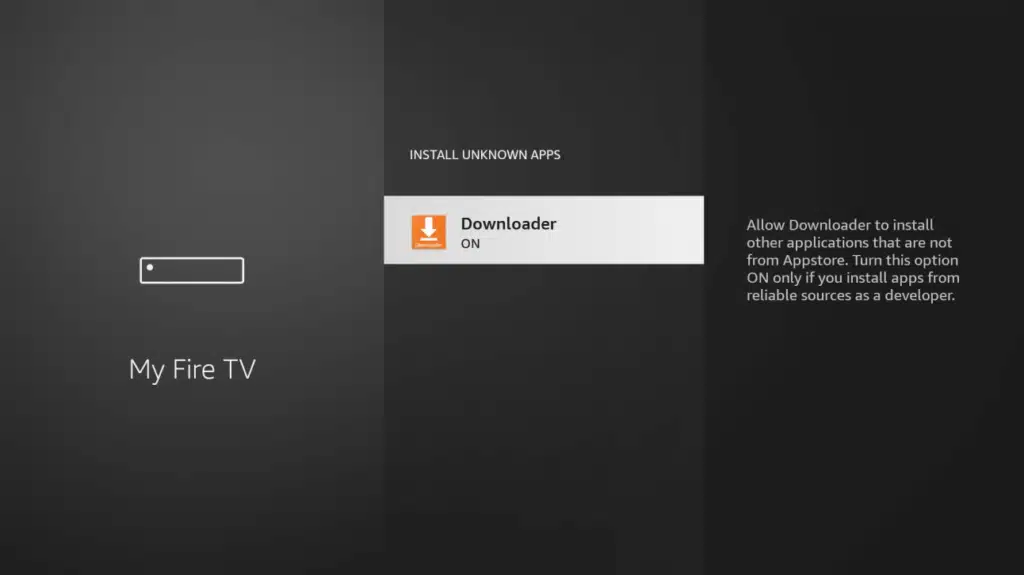
- Select Install unknown apps .
- Find the Downloader app in the list and turn it ON. This gives Downloader permission to install other apps.
Step 2: Install the Downloader App
Now, let’s get the tool that will fetch the IPTV Smarters Pro app for us.
- Go back to the home screen and use the search icon (the magnifying glass).
- Search for Downloader.
- Select the Downloader app (it has an orange icon) and click Download or Get to install it .
- Open the app when it’s installed. If it asks for permissions, select Allow.
Step 3: Use Downloader to Get IPTV Smarters Pro
This is where the magic happens! We’ll use a shortcut code to get the latest IPTV Smarters Pro on Firestick apk.
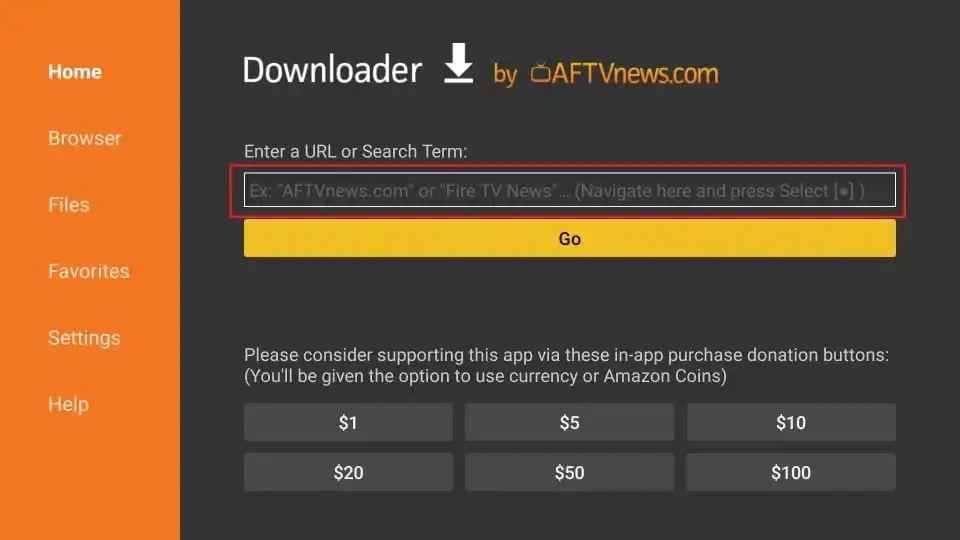
- Inside the Downloader app, you’ll see a URL box. Click on it.
- Type one of these Downloader codes:
224877,730116, or250931(which leads to the Troypoint Toolbox) . These codes are trusted shortcuts to the app file. - Click Go. The download for the IPTV Smarters Pro APK will start automatically.
- Wait for the file to finish downloading.
Step 4: Install and Open the IPTV Smarters App
You’re almost there! Now it’s time to install the app you just downloaded.
- After the download, the installation screen will pop up. Click Install .
- Wait for the installation to complete.
- Once done, you can click OPEN to launch the app immediately, or DONE to finish up .
- I recommend clicking DONE. The Downloader app will then ask if you want to delete the APK file. Click Delete to save space on your Firestick .
Step 5: Configure Your IPTV Service
Now, let’s set up the app with your service so you can start watching.
- Open IPTV Smarters Pro from your app list.
- Read and accept the terms of use by clicking Accept .
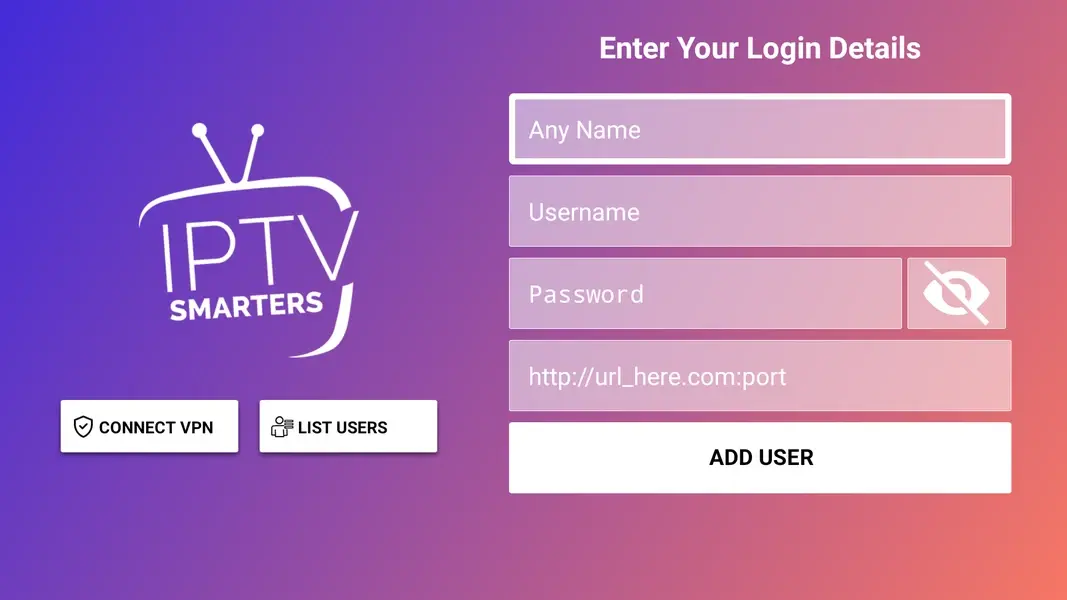
- You will see two main options. The easiest one to use is “Login with Xtream Codes API.” Click on that .
- Now, enter the information from your IPTV provider :
- Name: Any name you want for this playlist (e.g., “My TV”).
- Username: Your subscription username.
- Password: Your subscription password.
- URL: Your provider’s server URL.
- Click Add User. The app will now load your channels and videos. You’re all set!
Troubleshooting: What to Do When IPTV Smarters Pro on Firestick is Not Working
Sometimes, things don’t go perfectly. If you run into trouble, here are some simple fixes for when IPTV Smarters Pro on Firestick is not working.
Common Issues and Quick Fixes
- App Crashing on Launch: This can happen if the app’s cache is clogged. Go to your Firestick Settings > Applications > Manage Installed Applications > IPTV Smarters Pro > Clear Cache. Then try opening the app again .
- “Parse Error” or Installation Blocked: This usually means the APK file didn’t download correctly. Go back to Step 3 and try using a different IPTV Smarters Downloader code from our list. Also, double-check that “Apps from Unknown Sources” is enabled for the Downloader app .
- Login Failures (Invalid Username/Password): Carefully re-type your username, password, and server URL. These details are case-sensitive. If it still fails, contact your IPTV service provider to confirm your credentials are correct .
- Buffering and Playback Issues: A buffering stream is no fun! Try closing background apps on your Firestick to free up memory. If that doesn’t work, a strong VPN can sometimes help by preventing your Internet provider from slowing down your stream .
Finding Help and Reliable IPTV Smarters Pro Downloader Code Reddit Tips
Many users go to Reddit to find IPTV Smarters Pro Downloader code Reddit threads for help. While these communities can have good tips, be very careful. Not all advice or codes are safe. Some links might be outdated or even harmful. Always use Downloader codes from well-known, trusted tech websites like the ones referenced in this guide.
Frequently Asked Questions (FAQ)
Is it safe to use the IPTV Smarters Pro Downloader code?
The IPTV Smarters Pro app itself is safe and legal software . The safety of the IPTV Smarters Downloader codes depends on the source. The codes provided in this guide (like 224877 and 730116) come from reputable tech sites that regularly check their links. To stay safe, always stick to trusted sources and avoid downloading APK files from random websites or forums.
What is the difference between IPTV Smarters Pro and Smarters Player Lite?
This is a great question! IPTV Smarters Pro is the full-featured version designed for larger screens like the Firestick and Android TV boxes. It has all the advanced features like recording, multi-screen viewing, and parental controls .
Smarters Player Lite is a version made for mobile devices like iPhones and Android phones. It has a simpler interface for smaller screens and can be downloaded directly from the Apple App Store or Google Play Store . For your Firestick, IPTV Smarters Pro is the best choice.
Do I need an IPTV Smarters Pro subscription?
No, you do not need a subscription to the IPTV Smarters Pro app itself—the app is completely free to download and use . However, the app is just an empty player. To actually watch anything, you must have a separate paid subscription with an IPTV service provider. They are the ones who give you the channel streams and login details you need to use the app. Be wary of services that claim to offer “IPTV Smarters Firestick FREE Codes” for paid content, as these are often scams.
Conclusion
And there you have it! You now know exactly how to download IPTV Smarters Pro on Firestick. You’ve learned how to prepare your device, install the app using the Downloader tool, set up your IPTV service, and fix common issues. The whole process is straightforward once you know the steps.
Now it’s your turn to take action! Grab your Firestick remote, follow the steps in this guide, and in just a few minutes, you’ll be ready to explore a whole new world of streaming. Enjoy your shows